Planetary Dispersion
A downloadable tool for Windows and macOS
Planetary Dispersion
Planetary Dispersion is a standalone sound design tool for exploring how sound might behave in different planetary atmospheres.
It models dispersion, absorption, delay, filtering, atmospheric tuning, wind, seismic activity, environmental space, and medium changes across presets such as Mars, Venus, Titan, Jupiter, Saturn, Earth, the Moon, and more stylised fictional atmospheres.
It is designed for sound artists, composers, educators, students, researchers, and anyone interested in speculative acoustic environments.
Featured Demonstration
Demonstration video: https://www.youtube.com/watch?v=hGWhsxl7OQk
Full project page: https://danielportelli.com.au/planetarydispersion/
Unreal Engine project on Fab: https://www.fab.com/listings/f8af172e-9d01-4c82-86ce-555a7b8ed85d
Planetary Presets
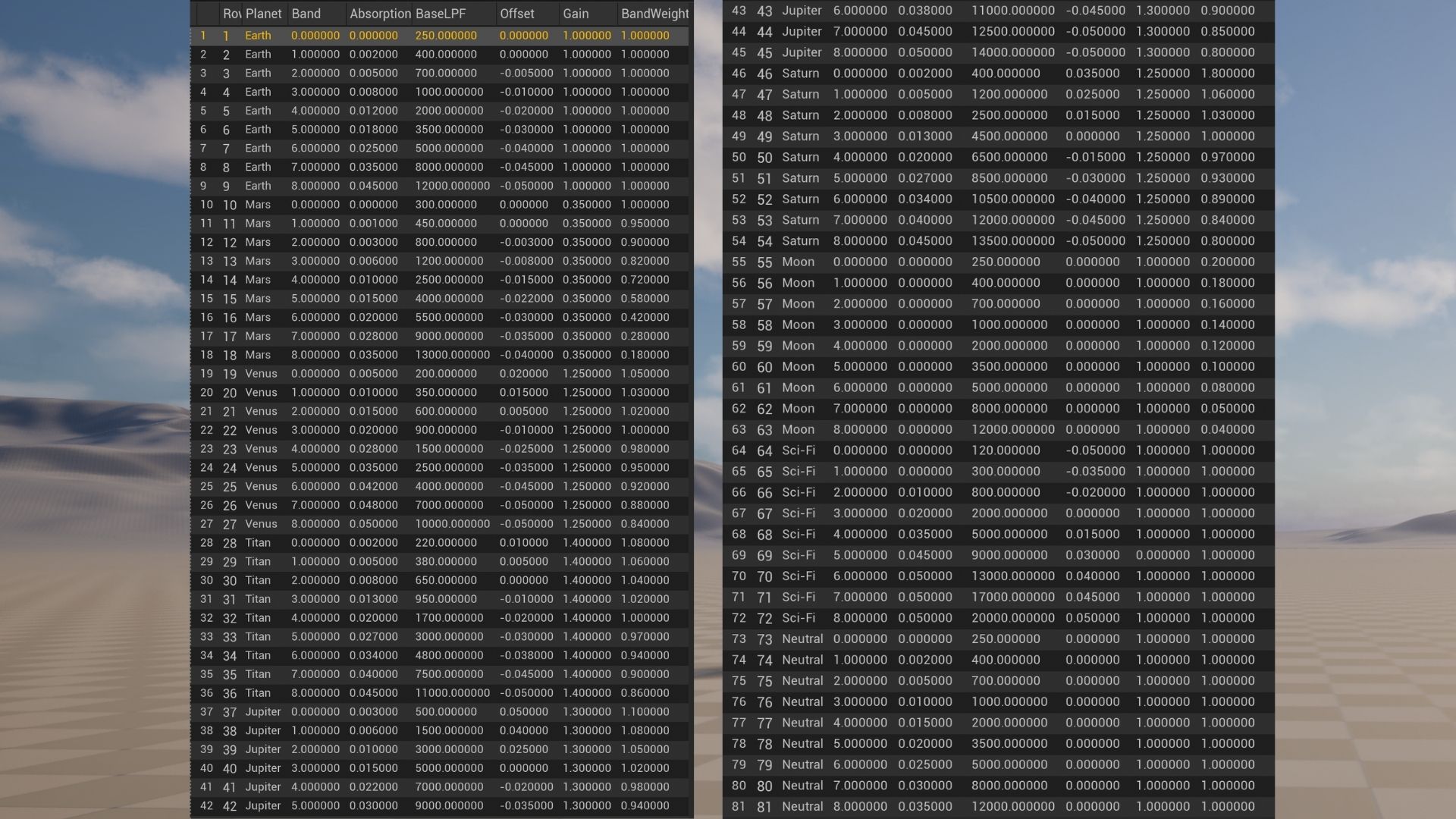
Planetary Dispersion includes fourteen pre-configured planetary and speculative acoustic environments. Each preset contains unique atmospheric parameters—including speed of sound, absorption, filtering, temporal behaviour, atmospheric intensity, environmental effects, and transition settings—allowing users to compare how different conditions influence sound propagation.
Jupiter
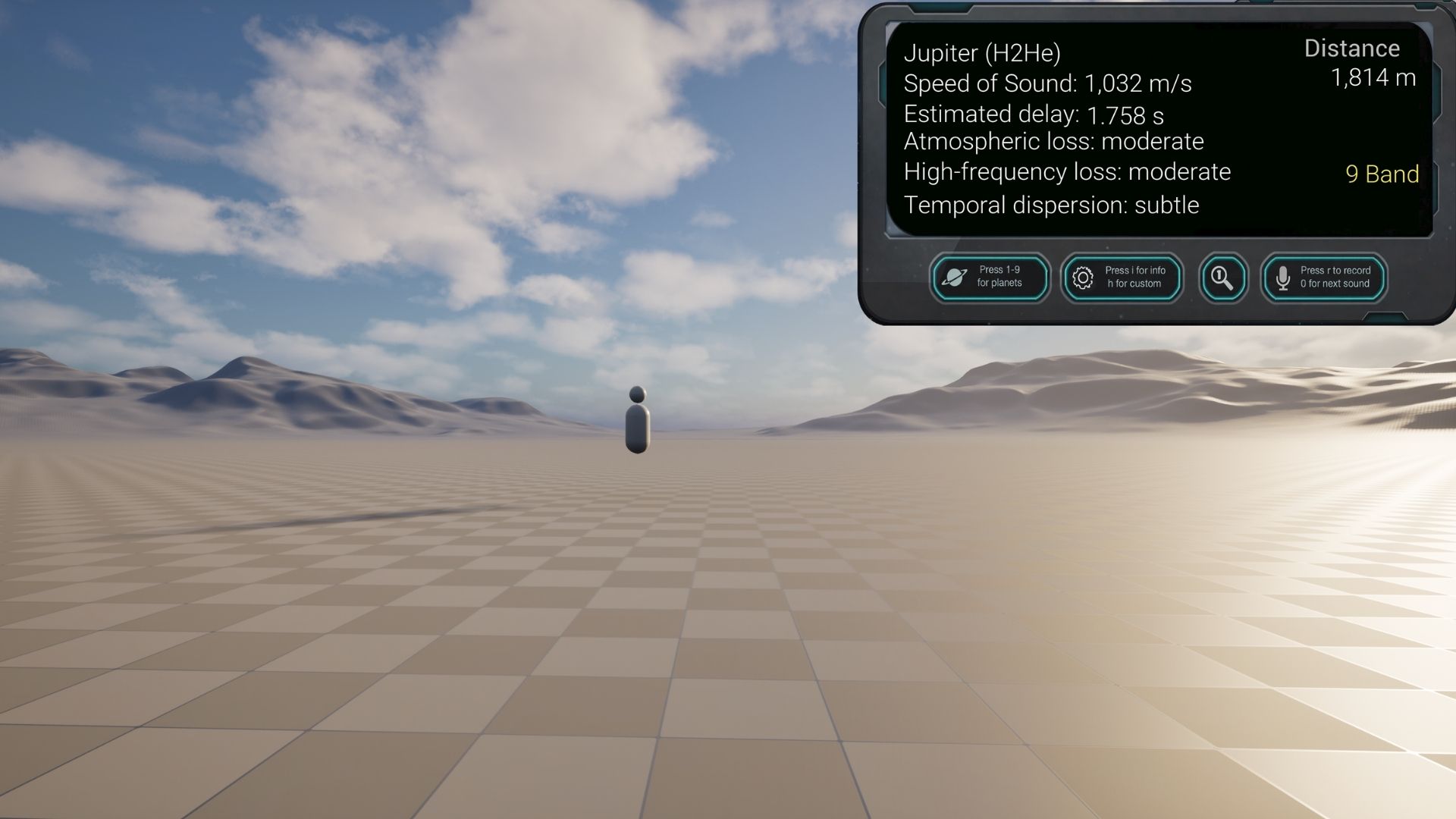
Gas giant atmosphere with a high speed of sound, low atmospheric absorption, strong high-frequency propagation, and optional air-column pitch behaviour for voice and wind-instrument-like sources.
Mars
Thin carbon dioxide atmosphere with a slower speed of sound than Earth, noticeable high-frequency attenuation, and reduced atmospheric density.
Earth
Reference preset representing familiar terrestrial acoustic conditions.
Venus
Extremely dense carbon dioxide atmosphere with strong high-frequency absorption, extended low-frequency propagation, and high atmospheric pressure.
Titan
Dense nitrogen-rich atmosphere with methane, a relatively slow speed of sound, and noticeable high-frequency damping.
Moon
Vacuum reference where sound cannot propagate through an atmosphere, demonstrating the absence of atmospheric acoustic transmission.
Saturn
Gas giant atmosphere with similarities to Jupiter but distinct propagation, absorption, and atmospheric tuning characteristics.
Io
A volcanically active moon with a tenuous sulfur dioxide atmosphere and distinctive propagation characteristics based on its extreme planetary environment.
Europa
An icy moon with an extremely tenuous oxygen atmosphere, resulting in near-vacuum propagation conditions and minimal airborne sound transmission.
Neptune
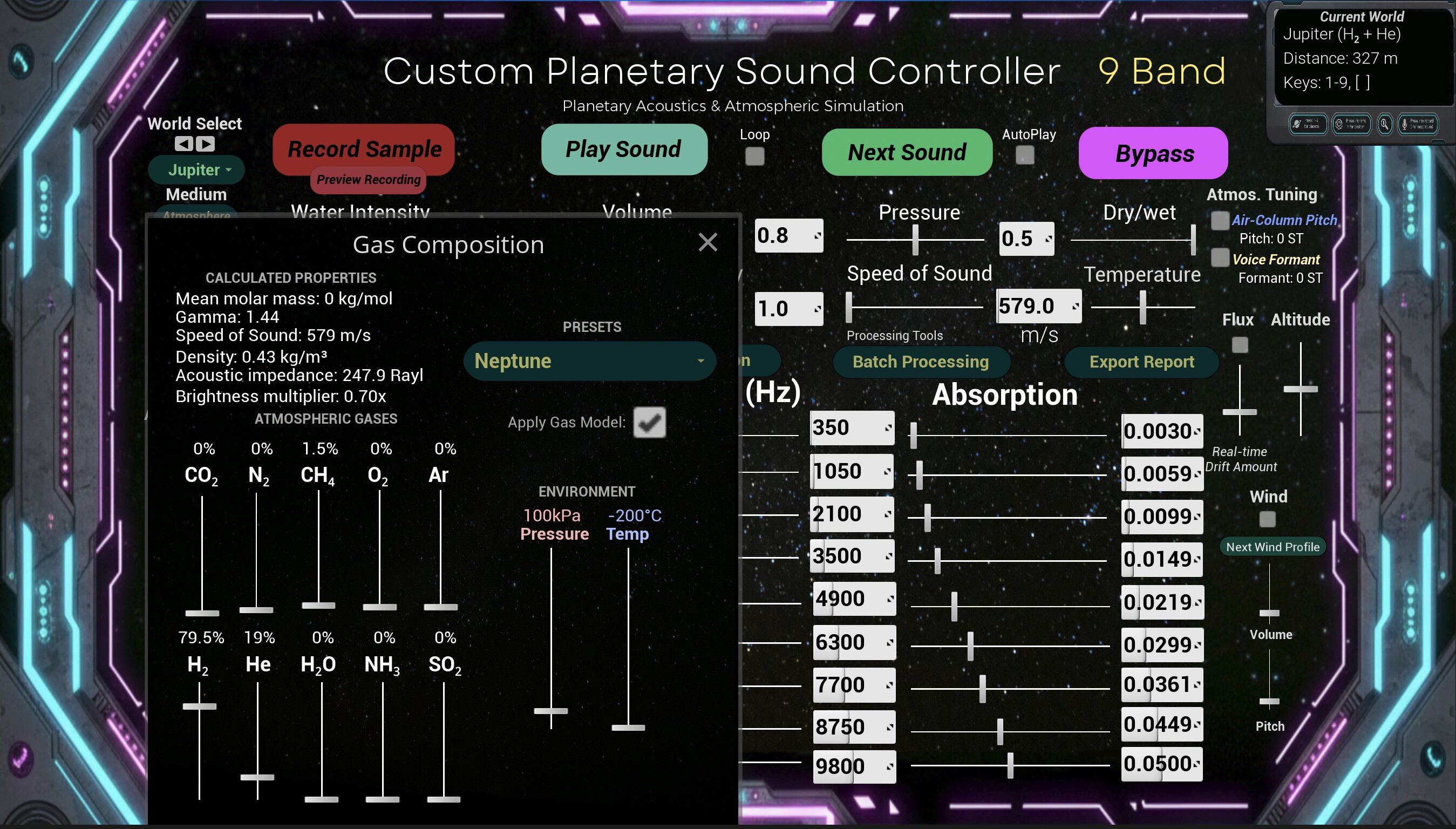
An ice giant atmosphere with distinctive propagation characteristics, atmospheric filtering, and environmental behaviour based on its cold, hydrogen-, helium-, and methane-rich atmosphere.
Pluto
A dwarf planet with an extremely thin nitrogen atmosphere, producing very limited airborne sound propagation and rapid attenuation.
WASP-121 b
A highly irradiated ultra-hot exoplanet with an extreme atmospheric model producing dramatic propagation behaviour, making it one of the most distinctive presets included in Planetary Dispersion.
Sci-Fi
A stylised fictional atmosphere with exaggerated propagation, filtering, and absorption effects designed for creative sound design and experimentation.
Neutral
A reference preset with minimal processing, allowing direct comparison between processed and largely unprocessed sound.
Test Sounds
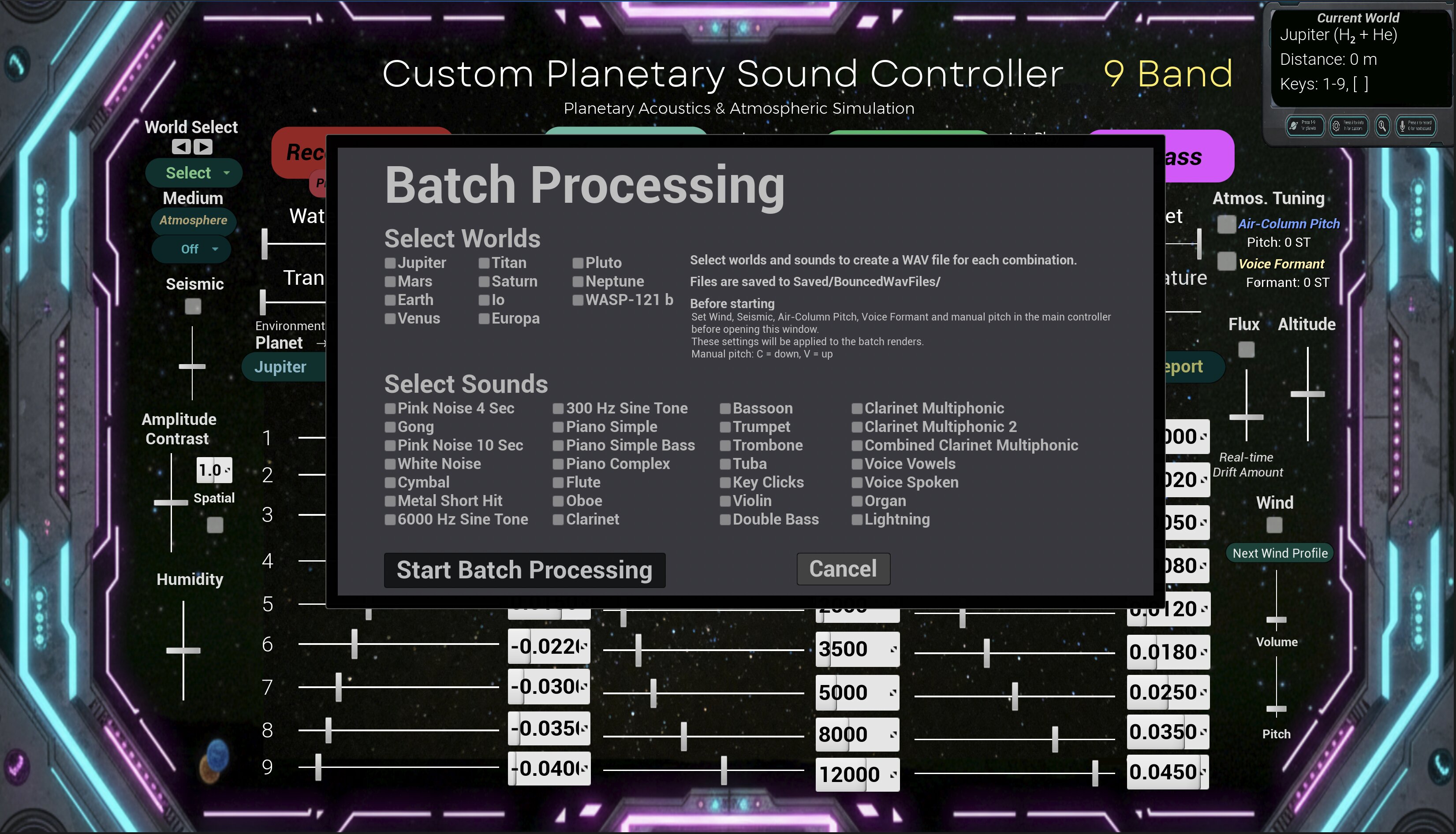
Built-in sounds now include pink noise, sine tones, percussion, piano, sustained strings, brass instruments, woodwind instruments, clarinet multiphonics, key clicks, and other reference sounds. These allow comparison of broadband noise, impulsive sounds, pitched musical material, air-column instruments, and sustained harmonic content across different planetary atmospheres
User Audio Input
The standalone application supports several ways of working with audio.
Built-in test sounds
Use the included sounds to compare planetary presets quickly.
Live microphone input
Use your microphone, audio interface, or selected system input as a live sound source. This can be processed through the Planetary Dispersion system in real time.
User WAV file playback
Place your own WAV file in the UserAudio folder and play it through the Planetary Dispersion system.
Master WAV recording
Use master recording to save the final processed output as a WAV file.
This means you can use the standalone version to process built-in sounds, live microphone input, or your own WAV file, then save the processed result using master recording.
MetaSounds, Patches, and Presets
Planetary Dispersion uses Unreal Engine’s MetaSound system with referenced MetaSounds and modular patches processing sound in real time.
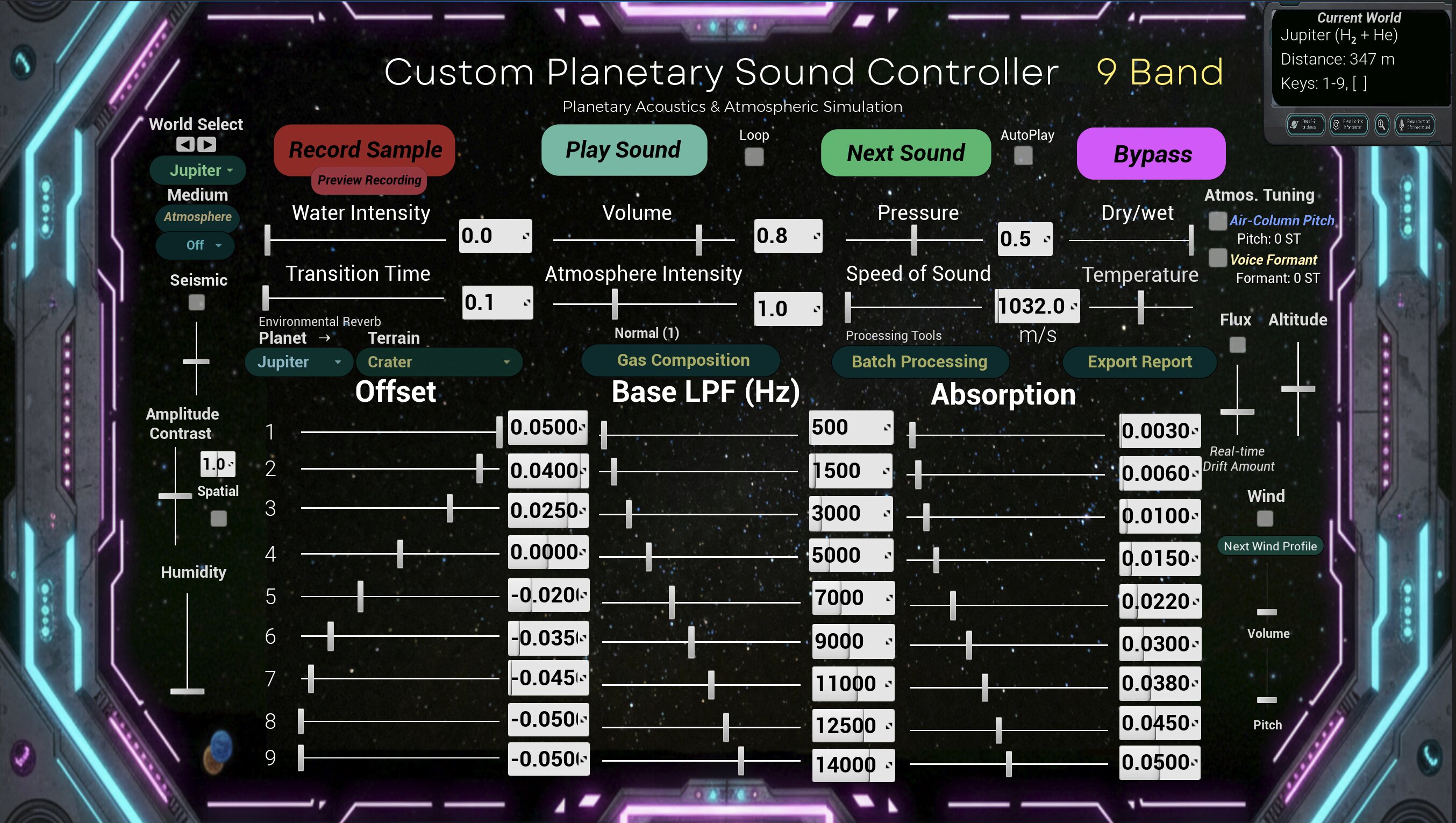
Each planetary preset stores atmosphere-specific parameters including speed of sound, absorption, filtering, atmosphere intensity, pressure, water intensity, temporal offset, and transition behaviour. This allows users to move fluidly between planetary environments while preserving distinct acoustic characteristics.
What the System Does
Planetary Dispersion allows users to explore and compare different planetary acoustic conditions through real-time controls and preset environments.
The project models how environmental conditions can influence sound propagation, spectral behaviour, temporal dispersion, spatial localisation, and atmospheric tuning.
Propagation and Atmospheric Conditions
Pressure, temperature, humidity, altitude, speed of sound, and atmospheric intensity.
Spectral Dispersion and Temporal Behaviour
Per-band filtering and temporal offset controls, amplitude contrast, transition interpolation, dry/wet balance, and signal bypass.
Environment and Medium
Air and water propagation modes, wind layers, seismic activity, environmental reverberation spaces, and dynamic flux modulation.
Source and Atmospheric Tuning
Included test sounds, user-loaded WAV files, live microphone input, atmospheric tuning controls, and air-column pitch-shifting behaviour for voice and wind-instrument-like sources.
Basic Controls
Planet Selection
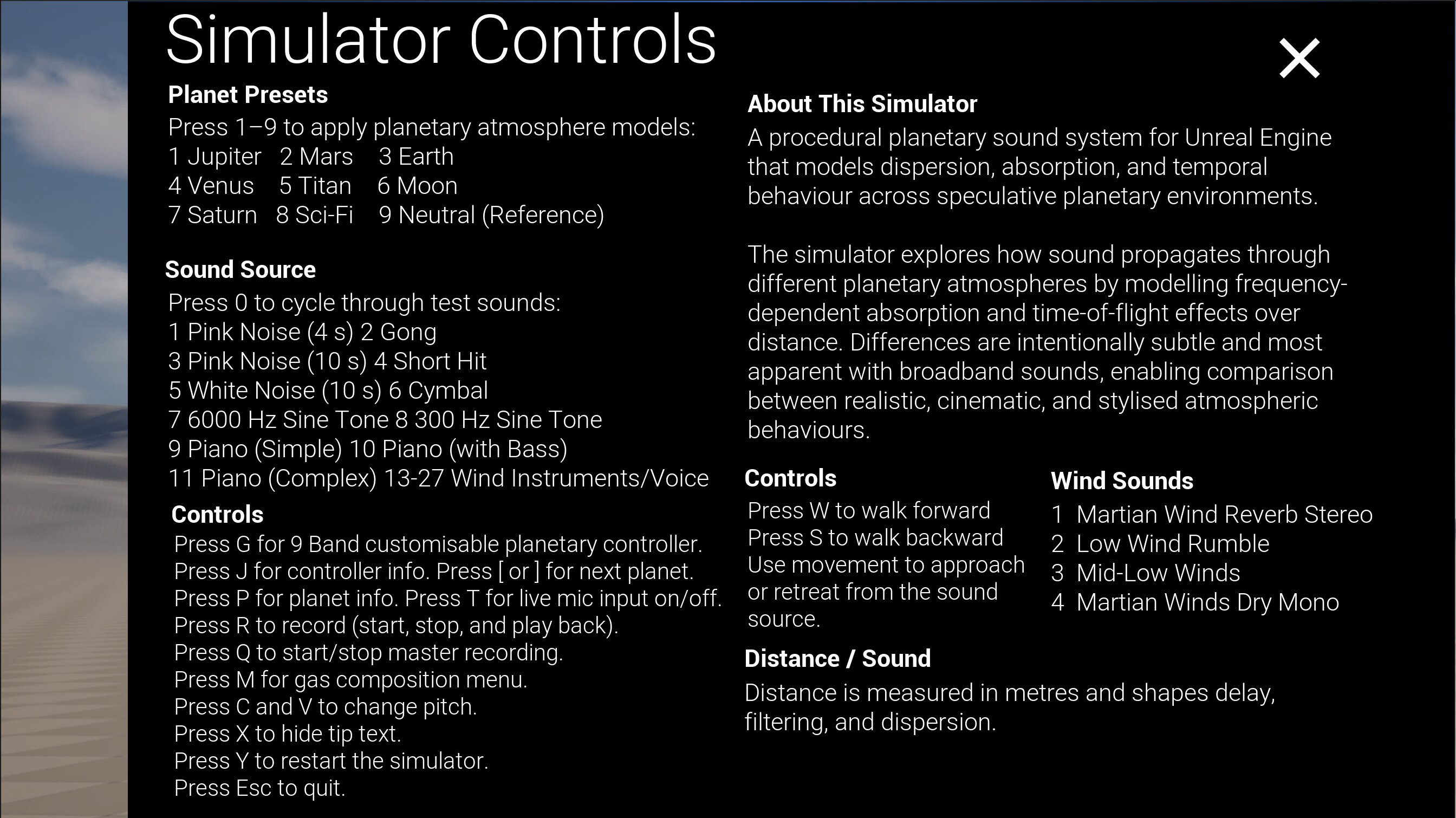
1–9 – Select planetary presets directly
[ – Previous planet
] – Next planet
Audio Sources
0 / O – Cycle through the built-in demonstration sounds
The name of the currently selected sound is displayed on screen.
T – Enable or disable live microphone input
U – Play or pause UserSound.wav
Recording
Q – Start or stop master WAV recording
The recorded file is saved to the application's Saved/BouncedWavFiles folder. The exact saved file path is displayed on screen after recording stops.
Sound Controls
C – Decrease manual pitch
V – Increase manual pitch
Information
P – Show or hide planetary information
I – Show or hide the information and controls panel
J – Show or hide additional project information
X – Toggle interface tooltips
System
Y – Reset the system
Esc – Quit the application
The standalone workflow is based around selecting an audio source, exploring different planetary environments, adjusting atmospheric parameters in real time, and optionally saving the processed output using the master recording system.
Installation
Windows
Download PlanetaryDispersionWin.zip, extract it, then open the extracted folder and run:
PlanetaryDispersion.exe
Do not move the .exe file out of the extracted folder. It must remain with the accompanying project files.
macOS
Download PlanetaryDispersionMac.zip, extract it, then open the Planetary Dispersion app.
If macOS blocks the app, right-click the app and choose Open.
Unreal Engine is not required to run the standalone application.
Using Live Microphone Input
The standalone application can process live microphone input through the Planetary Dispersion system.
On macOS, you may need to allow microphone access when the app first requests it.
If microphone input does not work, check:
System Settings > Privacy & Security > Microphone
Make sure Planetary Dispersion is allowed to access the microphone.
You can use the built-in microphone, an external microphone, an audio interface, or another selected system input device. For system-audio routing from another app, you may need a virtual audio device such as BlackHole or Loopback.
Loading Your Own WAV File
The standalone application can process your own WAV file through the Planetary Dispersion system.
Run the app once.
Locate the UserAudio folder inside the application’s Saved directory.
Place a WAV file in that folder named exactly:
UserSound.wav
Open the app and press U to play or pause the user-loaded WAV file.
To change the sound, replace UserSound.wav with another WAV file using the same filename.
The file must be a WAV file. For best results, use a standard PCM WAV file.
macOS UserAudio Folder
Usually located at:
/Users/[your username]/Library/Containers/com.DanielPortelli.PlanetaryDispersion/Data/Library/Application Support/Epic/PlanetaryDispersion/Saved/UserAudio/
In Finder, press:
Command + Shift + G
Then paste the folder path.
Windows UserAudio Folder
Usually located at:
C:\Users[your username]\AppData\Local\PlanetaryDispersion\Saved\UserAudio\
Or press:
Windows key + R
Then enter:
%LOCALAPPDATA%\PlanetaryDispersion\Saved\UserAudio\
Important
The file must be named exactly:
UserSound.wav
Do not place user audio inside the BouncedWavFiles folder. That folder is used for saved master recordings.
Master Recording
The standalone application can save the final processed output as a WAV file.
Press Q to start master recording.
Press Q again to stop master recording.
The saved WAV file is written to the application’s Saved/BouncedWavFiles folder.
On macOS, the file is usually saved inside the app container, for example:
/Users/[your username]/Library/Containers/com.DanielPortelli.PlanetaryDispersion/Data/Library/Application Support/Epic/PlanetaryDispersion/Saved/BouncedWavFiles/PlanetaryDispersion.wav
The exact saved path is printed on screen after recording stops.
Recommended Standalone Workflow
Use one of the audio input methods:
Built-in test sounds Live microphone input UserSound.wav from the UserAudio folder
Then adjust the planetary preset and sound parameters.
Press Q to start master recording.
Listen, perform, or interact with the system.
Press Q again to save the processed result as a WAV file.
Editor and Standalone Note
In the Unreal Engine editor version, some temporary microphone record-and-playback workflows may be available for testing. In the packaged standalone version, the recommended and supported workflow is live microphone input or user WAV playback, followed by master WAV recording.
The packaged standalone version should not be treated as a temporary mic recorder/player. Instead, use it as a real-time planetary processing tool and save the final processed output with master recording.
License and Usage
Planetary Dispersion is free to download and use for personal, educational, research, and creative purposes.
The application, interface, presets, documentation, and included media remain copyright © 2026 Daniel Portelli.
Redistribution, resale, repackaging, reverse engineering, or incorporation into another software product is not permitted without written permission.
Download
Click download now to get access to the following files:
Leave a comment
Log in with itch.io to leave a comment.